Showing posts with label iPad. Show all posts

Sunday, January 8, 2012

The ideal app for an ideal gas


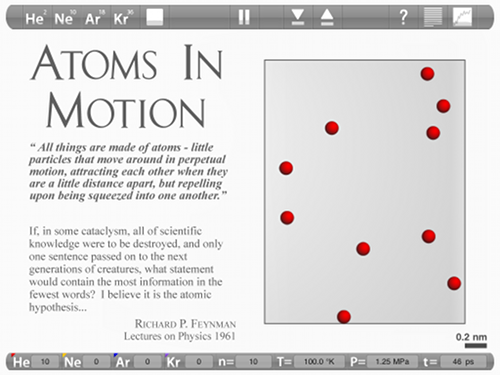
I recently came across a very cool app called Atoms in Motion ($2.99).  With this app you can perform molecular dynamics simulations of He, Ne, Ar, and Kr (and mixtures thereof) at different temperatures, volumes, and number of atoms.


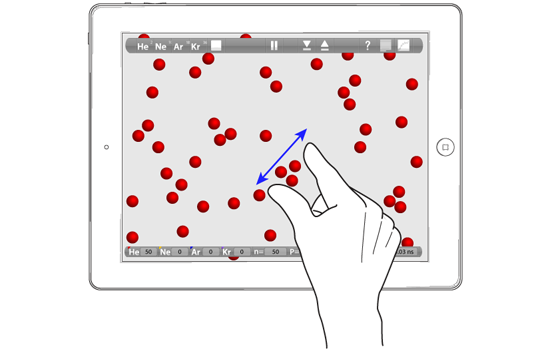
It is effortless to set up a simulation and change the conditions: swipe to change T (or shake the iPad!) and pinch to change V.  You can also flick an atom and, frankly, the most fun is to build a few clusters at 1 K and then move an atom carefully in position and flick it at a cluster! Something I have dubbed "atomic billiards".


Teaching
Since not every student has an iPad (yet), the main teaching-use will probably be in lecture, projection the simulation on using a VGA adapter (hint: simulations make for great peer instruction questions).  Because it is based on real simulations, and not pre-recorded movies, the app is very versatile and can be used to demonstrate very simple things like solids, liquids, and gases or an atomic view of temperature or relatively complex things like defects in solids and deviations from ideal gas behavior (using the plotting tool). 

However, the ideal use of this app would really be self-guided discovery.  Most features are very intuitive (the plotting tool takes some practice) and I'd love to see what a class of 10-year olds iPad users would get out of this. Side note: it would really have been great if the iPad could vibrate and the pressure could be linked to the vibration.


Documentation
Another strength of this app is the quality of documentation and extra information available in the app and on the top bar of the website.  I'm particularly impressed by the animated figure on "how big is an atom", which reminded me of the orders-of-ten approach.  I would be lovely to see a similar explanation of the nano-second.

Disclaimer: I was made aware of this app by the developer, but I bought my own copy, and was not asked to write a review on the blog.

Monday, May 9, 2011

Interactive chemistry ebooks: interactive figures

Here is version 2 of my ebook mockup page (see here for a description of version 1).  Actually there are two versions: one using Jmol and one for the iPad.

The Jmol version is how I would like the page to look.  The static figures are replaced with interactive Jmol versions embedded right in the page, and the figure captions contain links (denoted by ">>") to larger version of the figures on a separate page, that also contain extra features such as animations (Figure 3.1) or overlays (Figure 3.2).  An alternative design would have been to keep the static images, but insert links to the larger figures.  I think I like the current look better.  But for pages with more figures loading-time could become an issue with Jmol.

The iPad version is what is currently possible for the iPad with ChemDoodle Web Components.  We are waiting for two things to happen: 1) WebGL in Mobile Safari, which will allow real 3D representations of the molecules, and 2) Implementation of contours and surface maps in ChemDoodle Web Components.

For the iPad version I generated the necessary ChemDoodle Web Component HTML code using the ChemDoodle software package, as I show in this screencast.  The mol2 file I start with is generated with Avogadro.

ChemDoodle costs $60, and normally I restrict this blog to free software, but I am making an exception here because I think iChemlabs deserves to be supported since they made ChemDoodle Web Components open source.  Furthermore, since I have access to the source code I could probably figure out the format for the HTML code, if I wasn't so lazy.

Related blog-posts:
Interactive chemistry ebooks: highlight and annotate
Interactive chemistry ebooks: let us start now!
ChemDoodling: now in 3D, but not (yet) on the iPad
ChemDoodling on the iPad and the future of interactive chemistry text books
iPad: even 3D molecules that can be viewed from any angle

Sunday, May 8, 2011

Interactive chemistry ebooks: highlight and annotate

iPad

In a previous post I argued that the best way to get started on making interactive chemistry ebooks is to do it on the web with straight HTML, rather than wait for the epub technology to catch up.  But how would one highlight text and scribble notes in such a book?

One solution is to use Diigo, which is a free add-on to your browser as well as a free iPad app.  The picture above show a screenshot of annotation I added to the web page mock-up I talked about earlier.  Notice the "Web Highlighter" in the bookmarks bar, which, when clicked, gives you the blue tool bar you see.  The highlights and annotations are stored in the cloud, so they can be seen and modified from any browser where you have installed Diigo.  It also appears possible, though I haven't tried it myself, to share your notes with a group of people you define, which sounds like a very interesting study tool.

The computer version of the Diigo browser plug-in also has a "read it later" option, where the web page is saved and can be read in the Diigo app off-line.  For some reason this option is not there when using the iPad browser.  It also not possible to annotate in the Diigo app.  But I wouldn't be surprised if both options would appear in future releases.

Related blog-posts:
Interactive chemistry ebooks: interactive figures
Interactive chemistry ebooks: let us start now!

Thursday, May 5, 2011

Interactive chemistry ebooks: let us start now!

The problem
Henry Rzepa writes thought-provoking blogposts and his latest, entitled What is the future of books?, is no exception.  He describes the current state-of-the-art in science e-publishing and the very limited options and steep learning curves facing aspiring authors in this area.

Currently, there is only one publisher of interactive science e-texbooks: Inkling.  As a result, Inkling has their hands full and is unlikely to be interested in anything but the biggest best sellers in this area.

This means we chemists have to go at it alone, but there a is a big practical hurtle: there a no tools available to us.  The ePub 3 format that will allow interactivity will be released this month.  But when will tools to create and read ePub 3 files become available?

My first, and so far only, attempt at creating an ePub document taught me that the e-editors and e-readers are completely geared towards fiction.  Looking at Chapter 3 of Inklings Biology textbook on the iPad, which is available for free, is very educational.  Their design looks nothing like the traditional book that current e-readers such as Stanza and iBooks try to emulate with page swipes and similar layout considerations.  So we are not really waiting for these apps to become ePub 3 compatible; we are waiting for a science e-book reading app.  Who will write this and when?

One solution
But do we need all this stuff?  Broadly speaking, ePub is HTML in a zip file and ePub readers are hacked web browsers, and both are aimed at letting you read HTML off-line.   If we assume internet access, the need for ePub is mostly gone and this allows us to get started now by doing what we already know how to do: make interactive web pages.  Even if you think off-line access is essential, I hope you'll agree that "web-books" allow to test some design ideas for science e-books in ePub 3 format or book apps.

To kick things off, I have made a web page mock-up of how the section on electron density from my book Molecular Modeling Basics might look in the hands of the Inkling people, using an iPad-friendly template kindly made available by Matthew James Taylor. 

This is version 1, quite bare bones, and with a few blemishes.  For example, the top bar moves on the iPad (and on Chrome) because Mobile Safari does not respect position:fixed, and the Table of Content menu at the top doesn't work.  I would very much appreciate tips and suggestions from HTML experts on how to improve such things. You are very welcome to copy the HTML and the associated css, and experiment with this yourself.  (I am quite confident that a skilled HTML programmer could make a web page that is essentially indistinguishable from a page in Inkling's Biology book.)

Basic design considerations
Basic layout: The page can be read in both landscape and portrait mode.  The layout ensures that the main window is the same width in each mode, so that the formatting stays the same.  Portrait mode gives you reading without the clutter, landscape mode gives you access to options on the side.  Should the sidebar be on the left?  Should the sidebar scroll independently, and how do I do that?  When publishing Our Choice, Pushpoppress decided on landscape mode only, with a novel navigation, but I not sure this would look good for a real textbook. 

Continuous pages:  The section is not divided up in pages.  This avoids problems like figure captions spreading over 2 pages, but I think I would prefer this layout for fiction books as well: scrolling down on the iPad is a more natural gesture then side-swipe in my opinion.  I don't think I'll change that.

Table of content: Navigating a science textbook is very important.  The menu I have on the top left, will become too big, if I include the entire TOC.  Perhaps a nested drop down menu like this?  Could this be made to appear on a right-click?  Alternatively, I should I simply include a link to a separate page that holds the entire TOC, like iBooks?  Inkling's Biology book has a cool side-swipe feature where the TOC appears, but I have no idea how to do that.

Reading progress: Almost all readers have some indication of far along your are in the book or chapter, usually with dots.  Much of this is a legacy from novels.  In a textbook, you don't really care how much of the book you have read.  Perhaps it's important for a chapter?  Certainly in a section the position of the scroll bar is indication enough?  I don't think this has high priority.

Future plans
My plan for version 2 is to add interactive figures (should they be embedded or in separate pages?), and in subsequent versions I plan to add additional items to the right side-bar.  What should these items be?  Movies? Quizzes?  Again, suggestions are very welcome, as are links to similar mock-ups.

Now is the time to decide what interactive chemistry e-books should look like.  What do you think?

Related blogposts:
Interactive chemistry ebooks: interactive figures
Interactive chemistry ebooks: highligt and annotate
iPad: even 3D molecules that can be viewed from any angle
The Molecular Modeling Basics Electronic Color Supplement
Saturday, March 5, 2011

The Molecular Modeling Basics Electronic Color Supplement
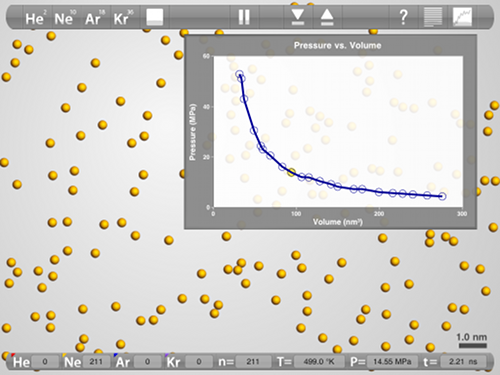
Fig3.2.3

Figure 3.5. (a) RHF/6-31G(d) 0.002 au isodensity surface with superimposed electrostatic potential for (a) cis-HO(H)C=C(H)OH and (b) cis-CH3(H)C=C(H)CH3 and. In both cases, the maximum potential value is 0.05 au. 

From page 79 of Molecular Modeling Basics: "Figure 3.5 shows such plots for cis-CH3(H)C=C(H)CH3 and cis-HO(H)C=C(H)OH and clearly shows the difference in polarity between hydroxyl and methyl groups."

Not really.
As I wrote on the blog: "A big part of the motivation for my blog came from writing a book called Molecular Modeling Basics that was published in May, 2010 by CRC Press. While writing the applications sections it was frustrating to turn the beautifully colored figures into black-and-white versions in order to keep the cost of the book reasonable. But it was also apparent that even colored figures in a book would be a somewhat poor substitute for the interactive versions they are based on. Especially, when turning them around to find just the right orientation for the figure. Wouldn't it be much better to have the reader decide for him/herself?

This is all a long winded way of explaining why there'll be a lot of posts with (color) figures that look like they came out of a book (they'll have figure captions below them). You can click on them for a bigger version. In many of the posts there'll also be a screencast showing how I made them, and an interactive Jmol version. They'll all be labelled "color figures from the book" so they should be easy find."

I have now made an electronic color supplement in epub format (dowload here), which is an edited compilation of these blog posts. I see it as the next step in the evolution of Molecular Modeling Basics, and it is my first experiment with the epub format. I used the (open source!) Sigil software, as suggested by Henry Rzepa whose ebooks and wiki how-to served as an inspiration.

ePub standards are far from universally accepted, so this color supplement can look very different in different readers.  On my Mac it looks OK in the Firefox epub reader plugin but not in Adobe Digital Editions or Stanza, while on my iPad it looks OK on both Stanza and iBook.  I would be interested to hear about problems or successes with these and similar platforms and software.

Almost all figures link to web pages with interactive Jmol versions of the figures.  None of the interactive models will work on the iPad, due to its lacks of Java support. In the not too distant future, Mobile Safari will support WebGL, and my plan is to slowly convert the interactive figures from Jmol to ChemDoodle Web Components, as the capabilities of the latter software increases.

Right now, accessing the interactive figures and videos switches you from the reader to a browser.
When the new epub format, epub3, matures (along with the readers) I hope it will become possible to view and interact with these interactive features directly within the reader.

In fact I hope to use this color supplement as a "laboratory" to experiment with these new capabilities as they become available, and make this color supplement a prototype for the next generation of scientific book publishing. Wish me luck ...

Related blog posts:
ChemDoodling: now in 3D, but not (yet) on the iPad
ChemDoodling on the iPad and the future of interactive chemistry text books
iPad: even 3D molecules that can be viewed from any angle

Sunday, February 6, 2011

ChemDoodling: now in 3D, but not (yet) on the iPad

 
You need Google Chrome or Firefox 4 to view the molecule.

In a previous post I wrote "The 3D version of ChemDoodle Web Components requires something called WebGL, which is not available in standard browsers yet, but should be soon.  You can get access to it now by downloading Google Chrome (BETA)."

Now you just need Google Chrome or Firefox, i.e. if you view this post in the Google Chrome or Firefox 4 browser you should be able to interact with the molecule.  Other browsers should include WebGL soon, and when it reaches Mobile Safari, it should work on the iPad.

This means ChemDoodle Web Components is ready for use in research and education.  It's quite easy to use: see here for installation instructions and here for a simple html example.  Furthermore, "Over the next couple years, we intend to match all functionality in JMol" according to Kevin Theisen.

I note that the ChemDoodle Web Components are open source, so feel free to pitch in!

Sunday, December 19, 2010

ChemDoodling on the iPad and the future of interactive chemistry textbooks


Interactive model of morphine

I have bought an iPad!  In honor of this purchase I bring to you this blog's first interactive figure that also works on the iPad (and most other mobile devices).  It is made with ChemDoodle Web Components (a modified version of this page), an open source javascript based toolkit for chemistry, made by Kevin Theisen and co-workers at his company iChemLabs.

Readers of this blog will know that I am quite fond of Jmol for interactive molecular models, but Jmol is written in Java, which is not supported by the iOS operating system that iPads, iPhones, and iPods use - and perhaps it never will be.   This decision by Apple basically means back to square one for interactive chemistry when it comes to the iPad.

I know of just two options for interactive models for the iPad: the Molecules app by Brad Larson and ChemDoodle Web Components (TwirlyMol does not appear to be interactive on the iPad).  The Molecules app looks a bit more three dimensional, but works only on the iPad.  Chemdoodle Web Components should work on most browsers and most operating systems, and a fully 3D version is also available.  The 3D version of ChemDoodle Web Components requires something called WebGL, which is not available in standard browsers yet, but should be soon.  You can get access to it now by downloading Google Chrome (BETA).

It is the Molecules app that is used in the interactive text book from Inkling that I wrote about earlier (thanks again to Henry Rzepa for the info).  But I think ChemDoodle Web Components holds tremendous promise for interactive chemistry textbooks when combined with another new innovation on the horizon: EPUB3.

Epub is basically code that makes XHTML look nice when viewed in an epub reader (such as iBooks), but the current version does not allow for things like javascript, needed for interactivity.  That will change with epub3 and, when combined with ChemDoodle Web Components, should allow us to make interactive chemistry textbooks that can be read on most devices.   It will be an exciting time.

Saturday, September 11, 2010

iPad: even 3-D molecules that can be viewed from any angle

I recently came across this report on inkling.com, a new company aimed at bringing interactive textbooks to the iPad.  Interactive molecular models was mentioned two times and clearly left an impression on the author (italics are mine):

"Inkling’s software turns textbooks into interactive content, with video, hyperlinks between text and images, notes that can be shared between students and teachers, and even 3-D molecules that can be viewed from any angle."

"MacInnis – who worked at Apple for eight years, including a stint in the company’s educational division — says that the iPad is the perfect device for the kind of interactivity that Inkling provides because it has the ability to produce high-end graphics, such as the 3-D spinning molecule that is a feature of the company’s biology textbook."

This feature is also shown in inklings promotion video, excerpt below:
Update: MacInChemBlog keeps a list of science related iPhone/iPad apps.