Showing posts with label getting started. Show all posts

Tuesday, August 24, 2010

Installing GAMESS on a linux PC


Probably best viewed in full screen mode

2014.02.18 Update: See this post by +Jimmy Charnley Kromann for more up-to-date instructions

Alchemist requested a post on installing GAMESS on a linux system: after all "I[f] someone can not install a program, how he/she can use it?" Fair enough.

If you have a mac or windows machine, pre-compiled versions of GAMESS is available (see this post on for installing such a version on Macs).  But if you have bought a linux computer, you do have to compile GAMESS yourself.

Three disclaimers:
(1) The post is aimed at people who want to install GAMESS on their personal computer that happens to run linux.
(2) The post is based on installing the March 25, 2010 version of GAMESS and corresponding scripts as they were distributed in mid August, 2010.  If you view this post a few years from now things may have changed.
(3) I don't have a linux PC, so the screencast is made on a shared research computer.  This affects one of the steps as I describe below, and may affect others steps that I don't know about.

The screencast assumes you have already downloaded gamess (gamess-current.tar.Z).  To download GAMESS start here and follow the instructions.  If you have problems watch the first few minutes of the screencast this post.

Here's a summary of the steps in the  screencast:

1. Unpack GAMESS: type "zcat gamess-current.tar.Z | tar -xvf -"
Now you should have a GAMESS directory.  The file gamess/misc/readme.unix has most of the instructions you need.  What follows it basically a condensed version with a few modifications.

2. In the GAMES directory: type "./config".
Follow the instructions and answer the questions.  You need to know whether you have a 32- or 64-bit chip.

3. Type "/sbin/sysctl -w kernel.shmmax=1610612736"
If you are curious about what this does, read section 5 of the file gamess/ddi/readme.ddi.
You need to be logged in as root for this to work.  I don't have root access on the machine I used, so I get an error message in the screencast.  But our system administrator had executed the command previously.

5. Change to the ddi subdirectory (gamess/ddi)Type "./compddi >& compddi.log" and then "mv ddikick.x .."

6. Go back to the gamess directory and type "./compall >& compall.log"
It will take 30-60 minutes to compile GAMESS.

7. Type  "./lked gamess 00 >& lked.log"

8. Edit the file rungms.  Here are the lines I modify or add:
set SCR=./
set USERSCR=./
set GMSPATH=./

setenv ERICFMT ./ericfmt.dat
setenv MCPPATH ./mcpdata

setenv  MAKEFP $USERSCR/$JOB.efp
setenv   GAMMA $USERSCR/$JOB.gamma
setenv TRAJECT $USERSCR/$JOB.trj
setenv RESTART $USERSCR/$JOB.rst
setenv   INPUT $SCR/$JOB.F05
setenv   PUNCH $USERSCR/$JOB.dat

   if ($os == Linux)   set GMSPATH=./

#  if ($NCPUS == 1) then
#     set NNODES=1
#     set HOSTLIST=(`hostname`)
#  endif
#
   set HOSTLIST=(`hostname`:cpus=$NCPUS)
   set NNODES=1 

#           echo I do not know how to run this node in parallel.
#           exit 20

9. Edit one line in the file runall: #chdir /u1/mike/gamess.
Type "./runall >& runall.log"

10. Go to the tools/checktst subdirectory and type "./checktst"
(Update: if the gamess directory is not in your home directory, you need to change this in the checktst file.  See this comment)

Running GAMESS in parallel
If you computer has more than one core, you may want to run GAMESS in parallel. To run exam01 on 2 cores type "./rungms exam01 00 2 >& exam01.log &"


Other useful programs and getting started with GAMESS
Now that you have GAMESS running you may want to install other useful programs such as Avogadro, GAMESSQ, and MacMolplt.
Here are some related blogposts to wet you appetite:
Using GAMESSQ
Building a complicated molecule with Avogadro

And here are a few blogposts on getting started with GAMESS:
Some GAMESS input basics
A typical set of GAMESS calculations

Acknowledgment: Mike Schmidt and Casper Steinmann helped with this post.

August 30, 2010 update: Alchemist has made the following page on installing GAMESS on Ubuntu 64 bit.  Be sure to check out the comments for additional useful links.

October 20, 2010:  Are you using Ubuntu 9.10 and 10.04, Linux Mint 8 and 9, Knoppix 6.2.1 or Suse 11.2? Be sure to check out this comment by Mott.

Saturday, January 2, 2010

Common error messages in GAMESS: Failure to locate stationary point

***** FAILURE TO LOCATE STATIONARY POINT, TOO MANY STEPS TAKEN *****
  UPDATED HESSIAN, GEOMETRY, AND VECTORS WILL BE PUNCHED FOR RESTART
**** THE GEOMETRY SEARCH IS NOT CONVERGED! ****
This error message was produced by the following input file. Can you see what's wrong?
$contrl runtyp=optimize icharg=1 $end
 $basis gbasis=pm3 $end
 $data
Title
C1
N     7.0    -0.39094     1.95659     0.14008
H     1.0     0.38874     1.60529    -0.40413
H     1.0    -0.08386     2.76975     0.70945
H     1.0    -0.72485     1.22934     0.80007
H     1.0    -1.14035     2.30329    -0.48754
O     8.0    -0.64579     0.16732     2.03360
H     1.0    -0.26212    -0.73042     2.10569
H     1.0    -1.00756     0.26750     2.93979
O     8.0    -1.80535     3.31298    -1.59619
H     1.0    -1.39440     3.81065    -2.33214
H     1.0    -2.74148     3.57968    -1.71559
O     8.0     0.26578     4.05264     1.54485
H     1.0     1.03270     4.27032     2.11226
H     1.0    -0.26135     4.87344     1.64760
 $end
Actually, there is no problem with the input file as such. A geometry optimization is an iterative process and if the gradient it not below the convergence criteria within 20 steps, GAMESS will stop and print out the message shown above.

The solution is simply to take the last set of coordinates and run the optimization again, as I show in the screencast below.

As I've mentioned in a previous post I think the default criterion for geometry convergence (0.0001) is too strict, and the default number of steps (20) is too small. So I usually use 0.0005 and 50, respectively.
$statpt nstep=50 opttol=0.0005 $end 


Friday, December 11, 2009

Common error messages in GAMESS: charge and multiplicity

  *** CHECK YOUR INPUT CHARGE AND MULTIPLICITY ***
THERE ARE 33 ELECTRONS, WITH CHARGE ICHARG= 0
BUT YOU SELECTED MULTIPLICITY MULT= 1
This error message was produced by the following input file. Can you see what's wrong?

$contrl runtyp=optimize $end
$basis gbasis=pm3 $end
$data
Title
C1
N 7.0 -0.39094 1.95659 0.14008
H 1.0 0.38874 1.60529 -0.40413
H 1.0 -0.08386 2.76975 0.70945
H 1.0 -0.72485 1.22934 0.80007
H 1.0 -1.14035 2.30329 -0.48754
O 8.0 -0.64579 0.16732 2.03360
H 1.0 -0.26212 -0.73042 2.10569
H 1.0 -1.00756 0.26750 2.93979
O 8.0 -1.80535 3.31298 -1.59619
H 1.0 -1.39440 3.81065 -2.33214
H 1.0 -2.74148 3.57968 -1.71559
O 8.0 0.26578 4.05264 1.54485
H 1.0 1.03270 4.27032 2.11226
H 1.0 -0.26135 4.87344 1.64760
$end
As GAMESS tells you, it is not possible to have singlet state (i.e. a multiplicity of 1) if you have an odd number of electrons. You need to tell GAMESS whether you want to change the multiplicity (for example, $contrl mult=2 scftyp=rohf $end) or add ($contrl icharg=-1 $end) or remove ($contrl icharg=1 $end).

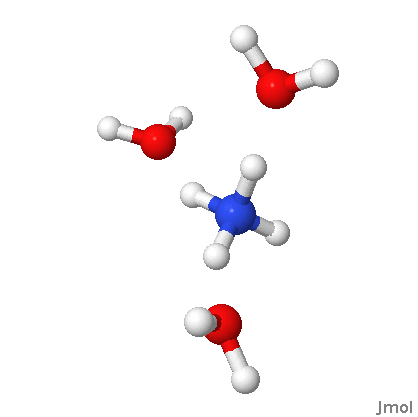
When looking at the molecule it is pretty clear that you want to remove an electron, since ammonium has a positive charge. So the first line in the input should be changed to
 $contrl runtyp=optimize icharg=1 $end


Click on the picture for an interactive version

Notice that you don't have to specify that the positive charge is on ammonium. The quantum mechanics will take care of that.

Tuesday, December 8, 2009

Common error messages in GAMESS: error reading IDUM

 **** ERROR READING VARIABLE IDUM     CHECK COLUMN  1
H 1.0 -0.08386 2.76975 0.70945
....V....1....V....2....V....3....V....4....V....5....V....6....V....7....V....8

This error message was produced by the following input file. Can you see what's wrong?

$contrl runtyp=optimize $end
$basis gbasis=pm3 $end
$data
Title
C1
N 7.0 -0.39094 1.95659 0.14008
H 1.0 0.38874 1.60529 -0.40413
H 1.0 -0.08386 2.76975 0.70945
H 1.0 -0.72485 1.22934 0.80007
H 1.0 -1.14035 2.30329 -0.48754
O 8.0 -0.64579 0.16732 2.03360
H 1.0 -0.26212 -0.73042 2.10569
H 1.0 -1.00756 0.26750 2.93979
O 8.0 -1.80535 3.31298 -1.59619
H 1.0 -1.39440 3.81065 -2.33214
H 1.0 -2.74148 3.57968 -1.71559
O 8.0 0.26578 4.05264 1.54485
H 1.0 1.03270 4.27032 2.11226
H 1.0 -0.26135 4.87344 1.64760
$end
The answer is the missing space in front of the $basis, and the solution is to add a space in front of it, just like for $contrl and $basis.

Why does GAMESS complain about a line in $data when the problem is with $basis? The reason is that it is possible to specify a basis set for each atom in $data, so GAMESS tries to read this information if no $basis group is found.

The error message would clearly benefit from the line: "Did you mean to specify a $basis group?"

Wednesday, November 25, 2009

Common error messages in GAMESS: No $data

**** ERROR, NO  $DATA   GROUP WAS FOUND
EXECUTION OF GAMESS TERMINATED -ABNORMALLY-
This error message was produced by the following input file. Can you see what's wrong?

$contrl runtyp=optimize $end
$basis gbasis=pm3 $end
$data
Title
C1
N 7.0 -0.39094 1.95659 0.14008
H 1.0 0.38874 1.60529 -0.40413
H 1.0 -0.08386 2.76975 0.70945
H 1.0 -0.72485 1.22934 0.80007
H 1.0 -1.14035 2.30329 -0.48754
O 8.0 -0.64579 0.16732 2.03360
H 1.0 -0.26212 -0.73042 2.10569
H 1.0 -1.00756 0.26750 2.93979
O 8.0 -1.80535 3.31298 -1.59619
H 1.0 -1.39440 3.81065 -2.33214
H 1.0 -2.74148 3.57968 -1.71559
O 8.0 0.26578 4.05264 1.54485
H 1.0 1.03270 4.27032 2.11226
H 1.0 -0.26135 4.87344 1.64760
$end
The answer is the missing space in front of the $data, and the solution is to add a space in front of it, just like for $contrl and $basis.

Sunday, August 2, 2009

Finding a transition state: an Sn2 reaction


Here is a screencast I made about finding a transition state for the reaction

F- + CH3Cl -> Cl- + CH3F

The general approach is as follows

1. Build the structure (F- + CH3Cl)
2. Optimize the geometry while constraining a key distance (between the F and C atom) to a certain value (2.0 Å)
3. Compute the frequencies for the optimized geometry to check for an imaginary frequency
4. If there is an imaginary frequency, use this geometry and frequency information as a starting point for the TS search

The distance constraint is imposed using

$zmat ifzmat(1)=1,1,6 fvalue(1)=2.0 $end

which is used in conjunction with the delocalized internal coordinates I discussed previously. 1,1,6 defines the distance (denoted with the first "1") between atoms 1 and 6. Note that this distance does not have be 2.0 Å in the guess geometry (though the closer it is to 2.0 Å the faster the optimization will converge).

I also show how the frequency information contained in the $HESS group, found at the end of the .dat file that GAMESS produces along with the output file, can be transferred to the input file for the TS search, where hess=read is used in $statpt. Any text editor can be used for this. Note that the hssend=.t. keyword has to be used to cause the frequencies to be computed at the end of the optimization. I have showed the use of this keyword in a screencast in a previous post.

The complete $statpt groups looks like this

$statpt opttol=0.0005 nstep=50 hess=read ihrep=5 hssend=.t. $end

ihrep=5 causes the frequencies to be recomputed at every 5th step. This really helps convergence but is computationally expensive.

Note that there are no constraints imposed when searching for the TS.

The key question is of course why I chose the C-F distance and 2.0 Å for the constraint value. This is simply the first thing that popped into my head and it happened to work. If it hadn't, I would have tried some other values and, if none worked, I would have tried to the C-Cl distance. Future posts will show examples of trying difference distances.

Because you may have to try different constraints before succeeding, it is a good idea to find the TS at a cheap level of theory, such as PM3. The C-F distance in the PM3 TS structure (2.10 Å) should provide a good guess for TS searches at higher levels of theory.

I tried it for this reaction using RHF/3-21G, but with no luck. That is because I forgot the very first step in searching for a TS: make sure there is one! In the screencast below I show how a RHF/3-21G geometry optimization (with no constraints) starting from F- + CH3Cl leads to Cl- + CH3F, meaning that the former structure is not a minimum on the gas phase RHF/3-21G potential energy surface. So there is not much point in looking for the corresponding TS.

Saturday, July 25, 2009

A typical set of GAMESS calculations


In this post I show the sequence of GAMESS calculations necessary to compute the free energy of the water dimer molecule at the B3LYP/6-31G(d)//PM3 level of theory. This notation means that the geometry and the free energy contribution is obtained with PM3, while the electronic energy is computed using B3LYP/6-31G(d) and the PM3 geometry. (By default the free energy is computed at 298.15 K and 1 atmosphere pressure.)

The steps are as follows:

1. Build the molecule

2. Optimize the geometry using PM3

3. Compute the frequencies for the optimized geometry to
a. verify that you found a minimum
b. compute the sum of the translational, rotational, and vibrational free energies at the PM3 level.

4. Compute the B3LYP/6-31G(d) energy for the PM3 optimized geometry

Some of the keywords I used have been described in a previous post, and I actually copy the keywords from this post to save typing.

The electronic energy for the water dimer is -152.7533 atomic units (au) while the sum of the translational, rotational, and vibrational free energies is 13.820 kcal/mol. If you repeat these calculations for the water molecule you get -76.3715 au and 2.271 kcal/mol (1 au = 627.51 kcal/mol).

So, the change in electronic energy on going from two water molecules to the water dimer is

ΔE = (-152.7533 - 2(-76.3715))*627.51 = -6.4 kcal/mol

The corresponding free energy change is

ΔG(298K) = -6.4 + 13.820 - 2(2.271) = -6.4 + 9.3 = 2.9 kcal/mol

Here I make the usual assumption that the electronic free energy is the electronic ground state energy.

Notice that the free energy change is positive meaning the water dimer is not predicted to form at this temperature and pressure (1 bar) under equilibrium conditions (the relative probability of observing the water dimer can be computed with this equation). This is because of the entropy of loss on going from 2 particles to 1.

Friday, July 24, 2009

Some GAMESS input basics

Update 2 August 2009: I have changed the discussion regarding the SG1 keyword. New text is in italics.

I have planned some posts in which some details of the GAMESS input will become important, so this post is about the basic anatomy of a GAMESS input file, and some non-default settings that I use all the time.

Here is an input file for a single point energy calculation at the B3LYP/6-31G(d) level of theory for the H2 molecule:

$contrl runtyp=energy dfttyp=b3lyp $end
$basis gbasis=n31 ngauss=6 ndfunc=1 $end
$data
Title line: you can write anything here
c1
H 1.0 0.0 0.0 0.0
H 1.0 0.753 0.0 0.0
$end


• The order of the groups doesn’t matter, so you can put the $basis group below the $data group.

• You can have several groups of the same kind (e.g. two $contrl groups). If you have the same keyword in both groups, it is the value in the last group that counts. For example,

$contrl runtyp=energy dfttyp=b3lyp $end
$contrl runtyp=optimize $end

is perfectly legal, and will result in an geometry optimization.

• The order of the keywords within a group doesn’t matter.

$contrl runtyp=energy dfttyp=b3lyp $end

is the same as

$contrl dfttyp=b3lyp runtyp=energy $end

• Note that there is a space in front of any line starting with a $ sign. This is important and if you leave it out GAMESS will not read that line. Note you can use this to “uncomment” a line by adding, for example, a ! For example, this

$contrl runtyp=energy dfttyp=b3lyp $end
!$contrl runtyp=optimize $end

will result in a single point energy calculation

• You can use capital letters if you want.

• For parameters that can be true for false, you can use either “.true.” or “.t.” and “.false.” or “.f.” (there's an example below).

• A line can only be 80 characters long. Anything after that is ignored. It is perfectly legal to split a line, for example:

$contrl runtyp=energy
dfttyp=b3lyp $end


Some useful options

Almost all of the parameters have default (but there is no default basis set and no defaults in $data). For example, the default runtyp is energy, so

$contrl dfttyp=b3lyp $end

will result in a single point energy evaluation. If $contrl is missing entirely, GAMESS will compute a single point energy at the RHF level.

There is a few defaults that I almost always change

Single point energy calculations (not AM1 or PM3)

$scf dirscf=.t. $end

This tells GAMESS to recompute the integrals at each SCF step rather than reading them from hard disk. Most computers can recompute a number faster than they can find it on the hard disk.

DFT single point energy calculations

$dft sg1=.t. $end

Computing the DFT energy requires a numerical integration over a grid. The default grid is very fine (has a lot of points). Standard Grid 1 (sg1) is adequate for most purposes and much faster. Note that this leads to inaccurate gradients and should not be used for geometry optimizations.

DFT, AM1, and PM3 frequency calculations

$force nvib=2 $end

DFT and semiempirical Hessians (second energy derivatives) are computed numerically, by displacing each atom in the x, y, and z direction and computing the first derivative. This is usually not accurate enough. nvib=2 leads to a displacement in both the positive and negative x, y, and z direction resulting in more accurate frequencies.

Geometry optimizations

$statpt opttol=0.0005 nstep=50 $end
$contrl nzvar=1 $end
$zmat dlc=.t. auto=.t. $end


I think the default criterion for geometry convergence (0.0001) is too strict, and the default number of steps (2o) is too small. So I usually use 0.0005 and 50, respectively. Optimizing in internal coordinates instead of Cartesian coordinates (default) usually speeds up convergence, because the former are "more quadratic". nzvar=1 tells GAMESS to use internal coordinates and dlc and auto tells GAMESS to automatically generate delocalized internal coordinates.

Unfortunately, the DLC implementation in GAMESS only looks for covalent bonds, not H-bonds and such. So you have to specify these if you have specify non-covalently bonded molecules in the input file. For example, in the case of water dimer (see figure for numbering), you do it like this

$zmat nonvdw(1)=1,4 $end

Note that you don't have to specify the H-bond in HO-CH2-CH2-OH, since the OH groups are connected by covalent bonds.

So, an input file for a geometry optimization of the water dimer would look like what I show below. That might seem a lot to type, but the trick is of course to type is once, store it somewhere handy, and copy it into new files.

$contrl runtyp=optimize dfttyp=b3lyp $end
$basis gbasis=n31 ngauss=6 ndfunc=1 $end
$scf dirscf =.t. $end
$statpt opttol=0.0005 nstep=50 $end
$contrl nzvar=1 $end
$zmat dlc=.t. auto=.t. nonvdw(1)=1,4 $end
$DATA
Title
C1
O 8.0 -4.42170 -0.11056 -2.11879
H 1.0 -3.53334 -0.03874 -1.70405
H 1.0 -4.75257 0.79398 -2.01675
O 8.0 -2.06207 0.35222 -0.78539
H 1.0 -1.13417 0.41136 -1.06880
H 1.0 -1.98676 0.07447 0.14406
$END

Thursday, July 23, 2009

Installing GAMESS on a Mac


NUchem (could be a pseudonym) suggested a screencast about installing GAMESS. In my case this will have to be installation on a Mac, and the installation on a Windows or Linux computer will be quite different.

If others want to volunteer similar screencasts of Windows or Linux do leave a comment on the blog. I'd be happy to post them or provide a link.

I use GAMESSQ to run GAMESS. It is also possible to run GAMESS from the command line, but I find GAMESSQ much more convenient, so this is what I suggest you use on a mac.

Tuesday, July 14, 2009

The mysterious GAMESSQ program


A recent question from Jacob Lerche mentioned a queueing program for GAMESS called GAMESSQ. Never heard of it. A google search only revealed that the latest MacMolPlt version has a "hook to it". Nothing on the GAMESS page. Strange ...

A few days later the another google search listed Jacob's question, that I posted on the blog comments, as one of the top hits, so now Molecular Modeling Basics looked like an authority on the subject and I decided to look into it.

The program is indeed bundled into the latest GAMESS download (which you can initiate here). It came with an brief manual in html format, so I put it on my web server here. The "about GAMESSQ" feature on the Mac tells me that the program is open source and written by one Jason Ekstrand and "commissioned" by MacMolPlt author Brett Bode.

Anyway, it is a very useful program, and I made a screencast about how to use it. What I don't mention in the screencast (which is already quite long) is (1) that the Jobs>open in wxMacMolPlt doesn't seem to work and (2) the program allows you to submit several jobs at once, which will then run one-after-another. Which of course is the whole point of a queueing program.

10 August, 2009. Update: GAMESSQ has now been officially released.

Wednesday, June 3, 2009

Showtime!


My first screencast! OK, actually it is my 3rd. The first one was a movie of my cursor moving around on the screen (I'm saving that for the bloopers reel), and in the second (my first real attempt) I forgot to move a window. The fact that I got this on the 3rd try tells you something about how easy it is to do this (though adding the comments takes a little time).

Anyway, this screencast gives a very brief overview of molecule-building with Avogadro and setting up a GAMESS input file.